Multi-platform SEO means making useful information discoverable in the places your customers search. It connects your website with relevant social, video, community, local, marketplace and AI discovery. The starting point is a customer question and a practical reason to invest in each platform.
Multi-platform SEO follows the customer’s decision
A customer searching for an air purifier is rarely trying to complete one task. They need to find suitable models, decide whether the noise will disturb their sleep, check replacement-filter costs and feel confident about buying. A product page can answer some of those questions. A demonstration or an owner’s experience may answer others more convincingly.
This explains why a search journey can move from Google to YouTube, a community discussion and an AI assistant before returning to a retailer’s website. The customer is looking for a different kind of evidence at each step. A useful multi-platform strategy gives that evidence a place to be found.
Multi-platform SEO, sometimes called search everywhere optimization, extends the work of discovery beyond your own website. You still need accessible pages and clear information, but you also consider the profiles, videos, listings and answers that customers encounter elsewhere. The objective is to help them reach a decision, rather than simply increase the number of channels carrying your logo.

My starting point is the uncertainty holding someone back. If a customer needs to see how an appliance works, another written description may not resolve it. The SEO opportunity is to make the right explanation discoverable in the format that helps.
A quieter bedroom.
A clearer choice.
best quiet air purifier for a small bedroom
air purifier unboxing and setup for a small bedroom
Anyone using an air purifier in a small bedroom? Is it quiet enough to sleep with, and are replacement filters expensive?
Help me choose an air purifier for a small bedroom. I’m a light sleeper and want low running costs. Compare the trade-offs and explain what to check before buying.
Example questions. Same purchase, different context.
The example above uses one purchase to show how the wording changes across platforms. The topic stays consistent, but a short product query, a demonstration request and a detailed comparison need different answers.
Choose search platforms by audience and intent
Before planning more content, find out where customers search for your category. Review referral traffic, the sources customers mention and the questions raised in sales or support conversations. Then search those questions on the candidate platforms. Compare which formats appear, which brands are visible and what useful explanation your business could contribute.
Consider two possible starting points. An appliance retailer whose customers struggle with setup could test a searchable video guide. A local service business receiving questions about opening hours and location may get more value from accurate Maps information. These are different priorities because the obstacle to the next step is different.
Platform popularity is useful context, but it cannot make that choice for you. YouTube may suit a detailed demonstration, Instagram a visual explanation and LinkedIn a professional buying question. TikTok is worth considering where it is available and relevant to the audience. Look for evidence of fit before committing to a publishing schedule.
Research search intent beyond a keyword list
A keyword research and clustering plan helps organize the topic. To understand what to produce, investigate the question behind the phrase. A search for a product name might mean “Where can I buy it?”, “Will it fit?” or “How do I use it?” The surrounding results and customer discussions help distinguish those needs.
- Search engines: inspect the result types and queries reaching your website. Look for whether people need an explanation, a comparison or a place to buy.
- Video: review demonstrations and their comments. A repeated question about a missing step can be a better starting point than making another general introduction.
- Communities & social ideas: read recurring discussions, comments and objections to find useful content ideas. Participate where you can contribute and follow the community’s rules, including disclosure of any affiliation.
- AI search: identify questions that combine constraints, such as room size, noise and running costs. These become inputs for the AI research exercise below.
Search suggestions and discussions reveal language and concerns; they do not establish exact demand. Combine those observations with measured queries and customer feedback. Geography matters too: international SEO research should account for local language, platform availability and buying habits before a channel plan travels to another market.
I would usually start with the website and one additional channel where the audience fit is convincing. Give someone responsibility for the content, replies and updates. A channel deserves continued investment when it helps a relevant customer question and the team can maintain the work.
Google Maps, YouTube and Shopping serve different needs
Even within Google, visibility is not one task. Someone looking for a nearby business needs location and availability; someone watching a demonstration needs an explanation they can follow; someone comparing offers needs reliable product information. Business Profile and Merchant Center manage parts of that presence, while Maps, YouTube, Shopping and image results are places where customers discover it.
| Surface and intent | Useful SEO work | What to review |
|---|---|---|
| Maps and local results Find a nearby business | Verify the Business Profile, choose accurate categories and maintain services, hours, contact details and useful photos. Encourage genuine reviews and respond to customers. | Relevant calls, website visits, direction requests and enquiry quality in context. |
| YouTube See how something works | Answer a specific question in the video. Align the title and description with the actual content; provide accurate captions and useful chapters. | YouTube search traffic and viewing behaviour; Google discovery separately through Search Console. |
| Shopping and product results Compare an offer | Maintain Merchant Center product data: descriptive titles, images, price, availability and delivery details. Match the landing page and resolve eligibility issues. | Free-listing visibility, clicks and purchases, separated from advertising. |
| Images and visual discovery Identify or inspect an item | Use clear original images, descriptive alternative text and relevant surrounding copy. Embed images in accessible HTML and keep the destination useful. | Image-search clicks and the actions taken on the destination page. |
Google’s local ranking guidance explains relevance, distance and prominence. Complete information helps Google understand the business, but there is no way to pay for a better organic local ranking. YouTube’s search guidance describes relevance, engagement and quality, including how closely the title, description and video match the query.
For retailers, Merchant Center free listings can make eligible products discoverable across Google without paying for each placement. Eligibility does not guarantee an appearance. For visual content, follow Google’s image SEO guidance: make images discoverable and provide helpful page context. A decorative photo with no explanation is a weaker answer to a product question.
The practical distinction is what you can improve. Local discovery depends partly on where the customer is; a clearer video can resolve an information gap; an accurate product listing can make an offer easier to assess. Treating all three as a request to “add more keywords” misses the reason each result is useful.
Marketplace SEO must make the offer easy to compare
A marketplace is a place to research products as well as buy them. Someone searching Amazon can compare specifications, prices, delivery options and customer reviews without visiting a brand’s website.
The 2026 PYMNTS Intelligence Global Digital Shopping Index, commissioned by Visa Acceptance Solutions, shows how several environments can contribute to product research. Among 3,013 respondents who used a computer, mobile device or AI platform to research their latest purchase, 55% used Google Search, 41% Walmart, 35% Amazon and 30% ChatGPT. The March 2026 study covered the United States, Brazil and the UAE.
These are reported uses during purchase research, not shares of all searches or exclusive first destinations. For a retailer, this suggests a practical research task: inspect how the same product is presented wherever customers compare it. Missing specifications or unclear delivery information can leave an uncertainty that the brand’s own website never gets a chance to resolve.
Improve Amazon product listings for search
On Amazon, keyword research connects directly with the listing: titles, descriptions, bullet points, search terms and product images. Amazon’s own SEO guidance also describes how shoppers filter and compare offers by price, reviews and delivery. Clear attributes and useful images help a customer assess the product, while the offer itself still has to be competitive.
For a quiet bedroom air purifier, that means making room coverage, operating noise and replacement-filter details easy to compare. A keyword-rich title cannot compensate for missing information. Measure organic product visibility separately from paid placements, then consider clicks, purchases and returns alongside ranking.
Connect website content with YouTube and social discovery
Once you know which question matters, decide where each part of the answer should live. Your website can hold specifications, service details and policies. A YouTube video can demonstrate the product, while a social post can introduce a specific use or answer a common question. Multi-platform SEO connects those entry points so customers can find the explanation in the place they choose to search.
Turning an article into a video is not simply reading the words aloud. A guide to changing an appliance filter can explain compatibility and replacement intervals on the website, then demonstrate the physical steps on video. A short social post might address one common mistake. Each version has a distinct job while relying on the same product information.
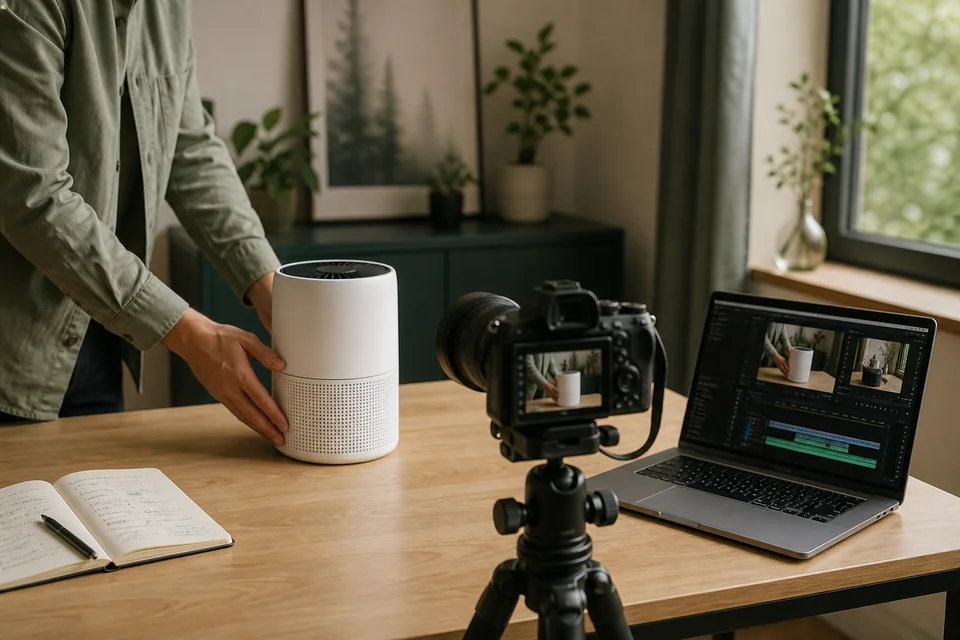
In my home-appliance eCommerce SEO case study, we used appliance guide videos on YouTube and Facebook to help increase search visibility beyond the website. Customers found these videos particularly useful for understanding how to use the appliances. The wider content also covered installation, delivery, returns and after-sales support.
This is a practical example of multi-platform SEO: the business’s knowledge becomes discoverable through more than its website pages. A YouTube guide gives someone searching for a demonstration a useful answer, while a Facebook video provides another place to encounter the explanation. Each platform has its own discovery and engagement patterns, so the same video should not be assumed to perform identically on both.
Keep the claims consistent and assign responsibility for updates. If a specification or policy changes, identify which pages, posts and videos depend on it. A useful content experience also connects the next step: the video explains the action, the page supplies the detail and the customer knows where to go if they need help.
What AI adoption means for your search strategy
AI assistants add a way to explore a decision through follow-up questions. Instead of opening several pages and comparing the details alone, a person can ask a tool to consider their requirements together. The reported growth of ChatGPT and the Gemini app makes this a discovery behaviour worth investigating.
ChatGPT
Weekly users
- October 2025800 million
- April 2026900 million
Bar scale: 0–1 billion users. Bars show reported thresholds.
Gemini app
Monthly active users
- May 2025More than 400 million
- August 2026More than 1 billion
Bar scale: 0–1 billion users. Bars show reported thresholds.
Compare change within each platform. Weekly and monthly users are different measures; these figures are not search volumes, market shares or a count of unique people across platforms. These are dated milestones, not a live audience tracker.
| Platform / metric | Reported date | Users | Source |
|---|---|---|---|
| ChatGPT Weekly users | October 2025 | 800 million | OpenAI announcement |
| ChatGPT Weekly users | April 2026 | 900 million | OpenAI announcement |
| Gemini app Monthly active users | May 2025 | More than 400 million | Google announcement |
| Gemini app Monthly active users | August 2026 | More than 1 billion | Google announcement |
The figures show overall adoption, including tasks such as writing and coding. They do not measure product searches or visits sent to businesses. My takeaway is to test whether the tools can find and accurately explain the information your customers need, rather than use audience growth as a forecast of your own traffic.
Check how AI platforms discover and describe your products
For an appliance retailer, a useful question might be: “I’m buying an air purifier for a 12 m² bedroom in Hong Kong. I’ll run it while I sleep. Which models should I compare, how loud are they on the lowest setting, and what will replacement filters cost each year?” This is an illustrative customer question: it names the product, location, intended use and details needed to compare options.
Try the same question in AI tools relevant to your audience, such as ChatGPT and Gemini, and compare the products and sources they surface. Does the answer point to a brand website, a retailer, a review or a video? That shows which sources appeared in that particular response. Then read it as a potential buyer would. Does it distinguish noise on the lowest setting from noise at maximum power? Does it explain how it calculated filter costs? Are the products and replacement filters available in the stated market? Follow the cited links to check where those details came from.
Suppose the answer quotes a filter price but says nothing about how often the filter needs replacing. Check your own product information first. If that detail is missing, explain the replacement interval, the conditions that affect it and the cost of a compatible filter. An annual-cost estimate should make its assumptions clear. That gives customers a more useful comparison and makes the information easier for an AI system to interpret.
If your page already explains the detail accurately but the AI answer gets it wrong, do not rewrite a correct specification to match the answer. Note the error and repeat the check later; one response does not establish a persistent problem. The purpose is to uncover missing or confusing information, not to chase every change in an AI recommendation.
Make your information accessible and easy to interpret
For Google’s AI Overviews and AI Mode, Google says existing SEO fundamentals remain relevant. A supporting page must be indexed and eligible to appear with a snippet. There is no special AI schema or additional technical requirement that guarantees inclusion.
Begin with accessible pages, clear explanations, useful internal links and accurate business information. Prioritize technical issues that prevent important content from being reached or understood. Keep essential facts in readable text, give charts labelled values and data tables, and explain screenshots in captions. Structured data should agree with what a reader can actually see. These choices help both readers and tools interpret the same evidence.
Google’s 2026 explanation of visual search describes using multiple related searches to interpret objects and questions within a scene. My practical takeaway is to connect useful visuals with clear product context, rather than treat image search as a separate decorative channel.
Other AI systems have their own access and retrieval arrangements, so Google’s guidance should not be treated as a universal rule.
I treat GEO as part of the wider work of making a business understandable and trustworthy. Effective SEO strategies bring technical foundations, useful content and external evidence together, with expectations grounded in what we can observe.
Measure search visibility across platforms
A customer can discover a video through Google, watch it on YouTube and visit your website later. Those are connected steps, but each reporting system sees a different part of the journey. Start by identifying the question each metric can answer.
Search impressions indicate that content appeared. Viewing behaviour and relevant discussions help you assess whether the explanation held attention. Identifiable website visits, purchases and enquiry quality show what happened closer to the business outcome. A growing total of views is encouraging only when you understand which audience and questions it represents.
Search Console’s 2026 updates make two parts of this picture easier to examine: your website’s visibility in Google’s AI features, and the Google discovery of content hosted on supported social platforms.
Track Google AI visibility in Search Console
Google launched Search Generative AI performance reports on 3 June 2026, with worldwide rollout completed on 31 August. These dedicated views show website impressions in Google’s generative AI features, including AI Overviews and AI Mode in Search, with a separate report for generative AI features in Discover.
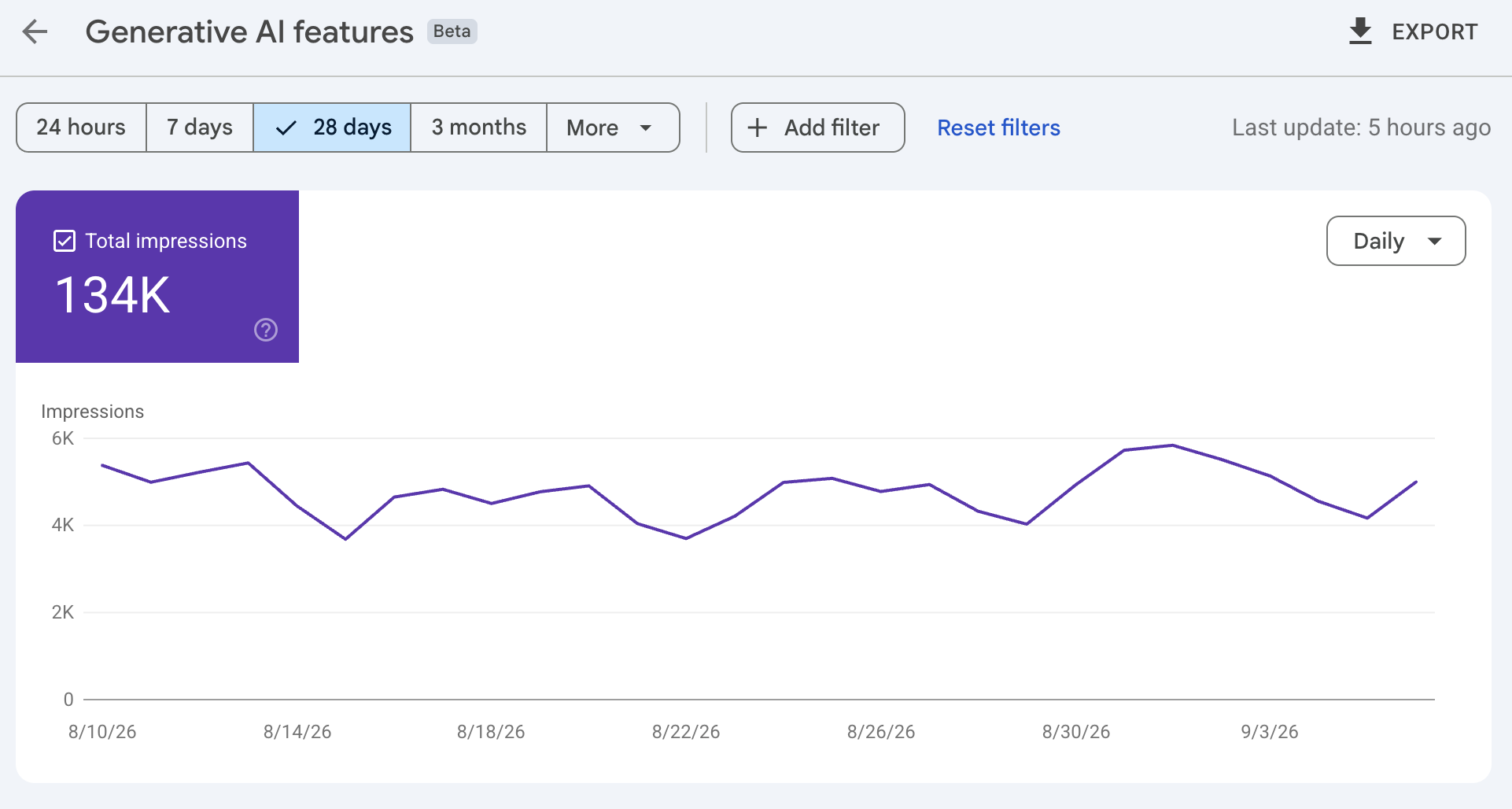
Review which pages appear and how visibility changes by date and country; the Search report also supports device analysis. Impressions indicate an appearance, not a visit, enquiry or sale. This is reporting for Google’s AI features, not a cross-platform tracker for ChatGPT, Claude or Perplexity. The AI impressions remain included in overall performance data, so do not add the dedicated report to the overall total.
Track social search visibility with platform properties
Google introduced platform properties on 7 July 2026 and announced global availability on 29 July. Supported platforms are Instagram, TikTok, X and YouTube. Creators can use the feature even without their own website.
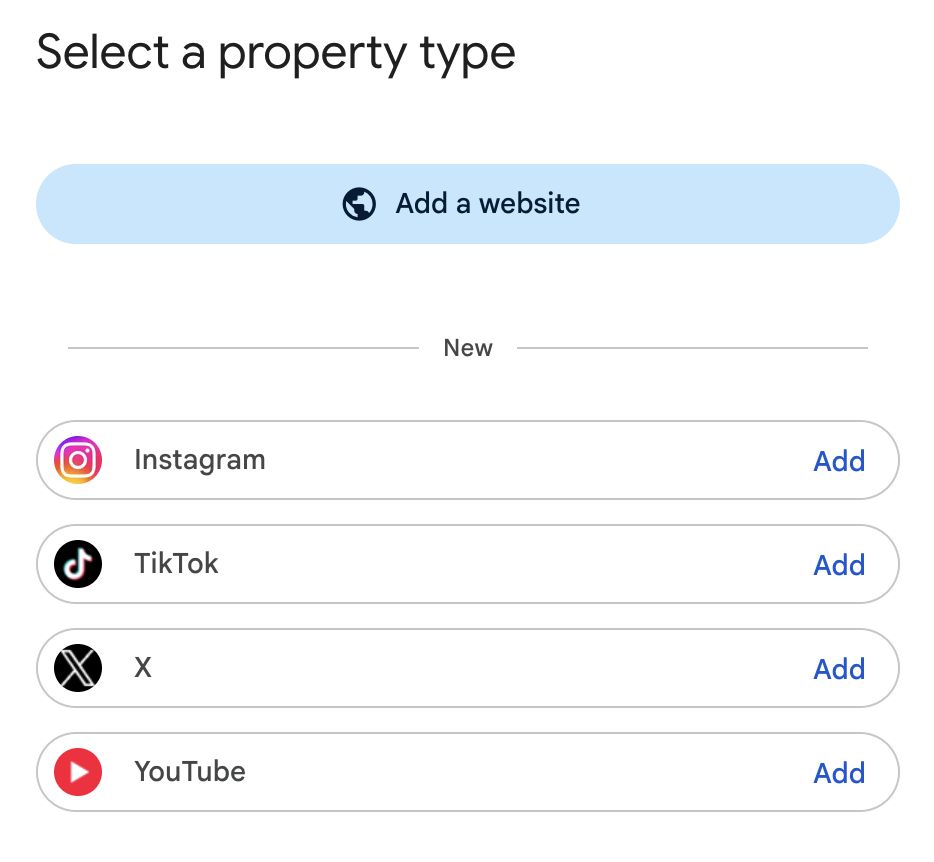
Open Search Console’s property selector, choose Add property, select the platform and follow the verification steps to authorize your account. The platform-property documentation explains the current setup and supported reports.
Use Performance to review Google clicks, impressions, posts and queries; use Insights to identify traffic trends. Where available, Discover and Google News reporting adds other Google discovery contexts. Use the relevant native analytics to understand what happens after someone reaches the platform.
Turn a reporting observation into a decision
Suppose a maintenance video receives search impressions, but its comments repeatedly ask about a step the demonstration skips. The query tells you the topic is being encountered; the comments suggest what the answer lacks. Improving that step or producing a focused follow-up is a more specific decision than simply publishing more videos.
Record what you changed and why, compare a sensible period and consider seasonality before attributing an improvement to the edit. Use campaign tagging on links you control where appropriate, connect identifiable visits with website actions and ask customers how they found you. Together, these observations can guide the next investment without pretending to provide a complete record of every purchase.
Start with one question and a connected set of content
For a first project, choose a recurring search question and one additional platform where your customers look for answers. An appliance retailer might improve its filter-replacement guide on the website and publish a corresponding YouTube demonstration, then compare website search traffic with the video’s search discovery. This is an illustrative starting point, not a fixed prescription for every business.
- Define the uncertainty. Record what the customer needs to understand and what evidence would help them move forward.
- Choose one additional platform. Explain why the audience and format fit, and agree who will maintain the content.
- Connect the answers. Make the page accurate, give the adapted content a clear job and link to the relevant next step where supported.
- Agree what you will learn. Review search discovery, useful engagement and customer feedback over a realistic period. Decide whether to improve, continue or stop.
A good multi-platform SEO strategy is a set of deliberate choices about where your knowledge is most useful. Expand when the evidence supports another channel, and keep improving the connection between being found, being understood and helping someone act.
Get help with your multi-platform SEO strategy
If your team is unsure where to focus, I can help connect customer research, content priorities and the technical work behind discovery.
Explore SEO consulting
Social SEO turns useful posts into answers people can find
Social discovery has two distinct starting points. Someone can actively search for an answer inside a platform, or encounter a post recommended in their feed. A video that attracts attention in a feed may work because it is surprising or entertaining. A search result needs to make its relevance to a particular question clear.
There is also an external route: eligible public Instagram content can appear in Google. A person may find a useful post without already following the account. This makes an explanatory post a potential search entry point, although publication does not guarantee indexing or ranking. The measurement section explains how to distinguish Google discovery from activity within the social platform.
Give each post enough context to stand on its own
A caption such as “Your new bedroom essential” assumes the viewer already understands the product. “How loud is this air purifier in night mode?” identifies a question the demonstration can answer. Explain which model is shown and the conditions of the demonstration, so viewers can judge what the example tells them. A phone recording, for instance, should not be presented as a calibrated noise test.
The account profile supplies another layer of context: what the business does, who it helps and where it operates when location matters. Check privacy and external-search settings before planning around Google visibility. Use descriptive captions, accurate subtitles and meaningful on-screen labels to make the explanation understandable. Relevant hashtags can provide context, but cannot compensate for a post that never answers the question.
Choose the format around what needs to be understood. A carousel can walk through several checks; a short video can show a physical action; a longer guide can explain a comparison. Where supported, add useful alternative text and a link to the relevant product or service. The destination should continue the explanation instead of making the reader start again at a generic homepage.